
- Home
- Global Shopping
- global shopping test
- ActiveImage Protector Linux
ActiveImage Protector Linux
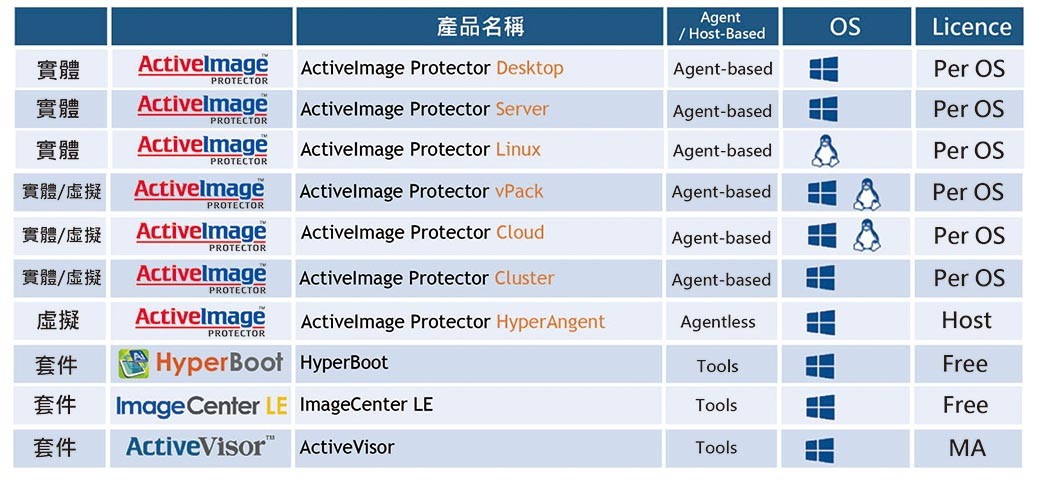
ActiveImage Protector is an enterprise-level backup and disaster recovery solution that supports both physical and virtual (Hyper-V/VMware), Windows/Linux, On-Premise/Cloud environments. ActiveImage Protector is the fastest and most powerful data protection solutions on the market, and provides all the necessary tools for enterprise deployment and management, immediate system recovery, switch-over availability, and virtual migration.
Note: To protect your rights and understand your environmental needs, please apply for a trial download before you purchase.
Image file based backup (supports LVM)
ActiveImage Protector™ backs up your entire machine, including the OS, settings, data files and applications, and access rights into a single image file. When disaster strikes, select a backup image to quickly restore for a fast and complete recovery. Linux edition supports backing up and restoring LVM volumes.
Direct-To-Cloud Backup
Backup systems directly to cloud storage. Supported public cloud storage services include Amazon S3 and Azure as backup destinations. In addition, Direct-To-Cloud Backup also supports SFTP servers as backup destinations.
Ensure full-state recovery
ActiveImage Protector™ backs up your entire hard disk including the operating system in a single operation. In the event of a hardware failure, the system can be restored to a different physical machine or a virtual machine.
Faster and smaller backup with Smart Sector™ technology
ActiveImage Protector™’s Smart Sector™ technology only backs up the used sectors on a disk, resulting in faster backup and smaller backup files.
Save storage space with IDDC
Our Inline Data Deduplication Compression (IDDC) feature eliminates duplicate data while simultaneously compressing it, resulting in a significant reduction in backup storage requirements. An included advanced option, IDDC has no impact on backup processing time. No additional deduplication hardware or software purchase is necessary.
Fast Incremental Backups
ActiveImage Protector™ includes a self developed change tracking driver that enables us to track the changes that occur on a volume incremental backups. Fast and efficient incremental backup includes only sectors that have changed from the last backuping saving you both process time and storage space.
Live Backup of MySQL, Oracle database and KVM on Linux
ActiveImage Protector™ offers image-based backup of live MySQL, Oracle and KVM without needing to suspend database ensure the data in the backup is consistent.
Cross platform Linux/Windows GUI
A cross platform graphical user interface that supports both Windows and Linux (X Windows) platforms. The GUI provides simple and easy access to ActiveImage Protector™ʼs features and settings across both platforms. CUI/CLI are supported.
Linux Based Recovery Environment
Perform a disaster recovery quickly and run cold back-ups with ActiveImage Protector’s Linux based boot environment (LinuxBE) on DVD or USB media. The LinuxBE is built on Debian to recognize the latest devices for use in recovery on dissimilar hardware.
Boot Backup Images Instantly using HyperBoot™
Using our real-time virtual conversion technology, HyperBoot bypasses the lengthy, resource intensive, and cumbersome physical to virtual conversion process, and boots the backup as a virtual machine in minimal time. Changes made while running the virtual machine from a backup are saved as differential files. A proverbial “Spare Wheel” for recovery, migration testing, repair, or upgrading prior to actual deployment.
Additional Linux Distributions Support
ActiveImage Protector Linux now supports Ubuntu 18.04 LTS and 20.04 LTS, Debian 9/10/11, RedHat 8.4, Rocky Linux 8, Alma Linux 8 and Amazon Linux 2.
Offline Environment Activation Support
With Actiphy Authentication Service (AAS) or a license file, ActiveImage Protector agents can be activated in an off-line environment.
Hardware
CPU:
Pentium 4 or above
Main Memory:
2GB or above. 3GB is recommended for “RescureBoot”.
Hard Disk Space:
2GB or more of available hard disk space is required at setup.
7 GB or more of available hard disk space is required for building AIP Boot Environment.
512 MB or more of available hard disk space is required when Boot Environment is not included.
To run backup tasks using the Deduplication Compression feature, reserving 1% or more of the total data of the backup source for saving the temporary working files in a volume that should not be included in the backup source is required.
DVD-ROM Drive:
Required to install the product and boot up the ActiveImage Protector Boot Environment.
Note:
ActiveImage Protector Linux Edition supports only x86_64 architecture
Secure Boot is not supported.
Internet:
Internet connection is required.
Operating System
Red Hat Enterprise Linux:8.0 – 8.4 / 7.0 – 7.9 / 6.0 – 6.10(x86_64)
CentOS:8.1 – 8.4 / 7.0 – 7.9 / 6.0 – 6.10(x86_64)
Oracle Linux:8.1 – 8.4 / 7.0 – 7.9 / 6.0 – 6.10(x86_64)
AlmaLinux 8.3 – 8.4
Rocky Linux 8.3 – 8.4
Amazon Linux 2
SUSE Linux Enterprise Server 15 / Desktop 15
LVM configuration is not supported
openSUSE Leap 15
Internet connection is required /li>
LVM configuration is not supported
Ubuntu 18.04LTS / 20.04LTS
LVM configuration for Ubuntu 20.04LTS is not supported
Debian 9 – 11
LVM configuration for Debian 11 is not supported
Notes on installation of the product
ActiveImage Protector Linux Edition supports only x86_64 architecture.
Secure Boot is not supported.
If installing the product on clone OS of Red Hat Enterprise Linux, please make sure the following packages are installed to run ActiveImage Protector’s installer. glibc.x86_64, libgcc.x86_64, libstdc++.x86_64, libuuid.x86_64, make.x86_64, nss-softokn-freebl.x86_64, zlib.x86_64, kernel-devel
If installing the product on Red Hat Enterprise Linux, CentOS or clone OS of the equivalent OS, please make sure the following packages are installed to install services only. fuse.x86_64, gcc.x86_64, samba-client.x86_64, unzip.x86_64, vim-common.x86_64, zip.x86_64, libsmbclient.x86_64, elfutils-libelf-devel.x86_64, libnsl.x86_64, perl.x86_64
For more information,click here
Description of the purchase process
Dear Sir:
Thank you for purchasing products from GATI. To protect your rights, please to apply for a trial download first to realize your environmental needs.
There are two methods to apply for trial download:
A. Apply online: fill in the version which you need to use https://www.actiphy.com.tw/download, we will reply within three working days.
B. Apply by phone: dial the service number (02) 2789-1100 # 550, we will serve you immediately.
Description of the download version purchase process:
1. Add to the shopping cart and select the payment method (only credit cards are provided) and check out.
2. When checking out, you will need to fill in the purchaser + recipient's E-mail + contact phone number, please be sure to fill it in correctly to facilitate tracking of the order and delivery of the trail key.
3. Within 1~2 working days, we will send the trail number to your E-mail.
4. Please follow the steps to download the file and enter the trail key to install and activate.
*Note*
※If you have not received the trail key, please check out your spam folder.
※This is a digital download version. The trail key will be sent by Email, and no physical products will be shipped. Please pay attention before you purchase, thank you.
※Please choose the product you need carefully before purchasing. The trail key will be displayed by mail. Once you get the product, you cannot return or exchange the product.
※This is a digital content service and completed as soon as it is provided. The free return within 7 days is not applicable. If you purchase it with your prior consent, according to the provisions of the Consumer Protection Law, you will not be entitled to the free return within 7 days. No return is allowed.
Information about apply for Actiphy activation code:
1. Product software name (please specify version).
2. Purchase detail (individual/company).
3. Purchaser's name, e-mail address, and telephone number.
4. Purchase date (order date or order date).
If you have any questions during the operation, please contact the customer service, we will serve you immediately. Thank you for your support and cooperation.
Service Email: service@gati.com.tw
Service Tel: (02) 2789-1100#550